Quick note on Webdriverio

The web team at TigerText uses CucumberJS, Selenium, and Webdriverio for its unit tests. However, I was unable to get it to run on my machine; Selenium would open a Chrome window to the url "data;,", then do nothing. After hours of Googling and headaches, the problem ended up being that some of the files the tests use had syntax errors in them. Webdriverio didn't spit out any error messages whatsoever, which made finding the problem difficult. I couldn't find any mention of this on the internet, so I thought I'd post my findings for the good of everyone.

Happy unit testing.
Site upgrades!

All posts now have Disqus comment integration, so the few visitors this site has who aren't Russian bots can weigh in on my coding escapades. There's also pagination since I have over five posts now, and even an RSS feed! I've never seen a person actually use RSS in my life, but it's there.

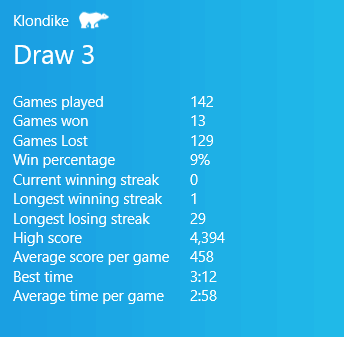
Klondike is hard

So, I'm bad at Solitaire. Like, really bad. However, I'm good at writing code and just took an algorithms course this semester, so one afternoon I decided to make up for my complete lack of card game strategy with brute force. About twelve hours later, I had a working Klondike generator and solver. Unfortunately, it doesn't seem to solve many initial states, but I'm not sure if that's because my code is bad or because the shuffling routine I use is just really good at making unsolveable decks.

Whatever the reason is, it's pretty fast at calculating moves due to a multithreaded architecture and a thread-safe priority queue that allows for a sort of hill-climbing algorithm. It often gets stuck in local maxima, though, but I think that's just due to the nature of Klondike.

On a related note, it's almost the 25th birthday of Windows 3.0, the first version of Windows to include the familiar card game. Happy birthday, you dinosaur.

The code is here.

FizzBuzz in CSS

While I was making this site, I discovered that Chrome has a bug with really tall gradients. The beveled corner effect I have on here is done like this:

.blog-post-outline { background: linear-gradient(135deg, transparent 15px, rgba(0,0,0,0.5) 0); padding: 5px; } .blog-post-content { background: linear-gradient(135deg, transparent 15px, white 0); padding: 15px; /* ... */ }

Chrome fails to actually render it when the div it's in is tall enough, instead just showing the standard 90 degree corner. To see what I mean, open up [this long post]({% post_url 2015-2-21-buddhabrot %}) in Chrome and look at the upper left-hand corner of the post. The sidebar and the excerpt on the homepage work fine because they're shorter. This Codepen demonstrates the issue as well. IE11 has no problem with it and while Firefox blurs the edge pretty badly, it does show up. The Chrome team has known about this for about two years now, but there's been no real progress since. I hope they fix it soon, but until then I'll have to find a workaround.

EDIT: Hey, they fixed it in July 2016 and I didn't notice!